
Shaw Email Password Problems? Help for Seniors in Sidney, BC
Illustration of a Saanich Peninsula senior couple struggling with Shaw email passwords on their laptop, alongside a MyRogers sign-in screen.
I sat across from Maria and Greg at their dining table.
They both looked worn and frustrated, having spent the last few hours on the phone with Shaw, hopelessly trying to get their emails working again.
"Gavin, we haven't been able to get into our emails for three weeks now!" Maria said, exasperated.
"I have an important document from the lawyers I need to get, and no matter what I do, I can't seem to get in!”
"Also, my iPhone keeps asking me to re-enter my email password, and I don't even know where to find it!"
Greg interjected at this point.
"We've been on the phone with Shaw these past few days for hours. Sometimes we waited an hour, and sometimes we just gave up."
"When we did get through to someone, we could hardly understand the instructions. And even after all the button pressing, they weren't able to fix it. They said, 'Just get another email!'"
"We're at a complete loss at this point... honestly!" Greg said, throwing his hands up.
This is perhaps one of the most common situations I encounter when working with my senior clients here in Sidney and throughout Greater Victoria.
There are several confusing parts to how Shaw/Rogers email accounts work, especially when setting them up on computers and phones.
And for people who depend on email for important communications, these frustrations can cause genuine anxiety and sleepless nights.
Let's look at three of the biggest problems.
Number One: Adding Shaw Email to Your Computer or Phone Isn't Always Intuitive
Can you go online and follow the instructions?
Yes.
But are those instructions easy for everyone to understand?
Not necessarily!
In my experience, many of senior clients find the process confusing, not because they lack the ability, but because the instructions assume you already understand how email accounts and your devices talk to each other.
When you're asked to enter server settings, choose an account type, or configure incoming and outgoing mail, that’s when most people go ‘excuse me?’.
And that's before anything goes wrong!
Number Two: What the Heck Is IMAP?!
When adding Shaw email to Apple Mail, Outlook, or another email program, you may encounter a technical term called IMAP.
Most times you would not have to deal with it, but sometimes, when things don’t go click immediately, you do.
At this point, most people look at me and say:
"What the hell is IMAP?!"
Think of IMAP as the communication system that allows your email program to talk to Shaw's email servers.
It's what helps keep your messages synchronized between your computer, phone, and Shaw Webmail.
For example, if you read an email on your iPhone, IMAP can help keep that email marked as read when you open your mailbox on your computer.
Simple enough when someone explains it, right?
But there's another complication.
According to Rogers' current instructions, Shaw Webmail must be set to Classic mode to use IMAP or POP access.
In Webmail's preferences, you may also need to enable access for other email programs.
And here's the catch: switching to Classic mode needs to be done through a computer rather than a mobile device.
No wonder seniors (and just about everyone) gets confused!
Number Three: Your MyRogers Account Is Different From Your Shaw Email Account
This is probably the most important thing I want you to understand.
Your MyRogers (Shaw) account and your Shaw email account are two different things.
And their passwords are different, too!
Your MyRogers (Shaw) account
This is where you manage your Rogers/Shaw services - internet, billing, and your existing Shaw email accounts.
You sign in using your MyRogers (Shaw) username and password.
Your Shaw email account
This is where you actually read, send, and receive your emails.
You can access it through Shaw Webmail or through an email program such as Apple Mail or Outlook.
You sign in using your Shaw email address and its own password.
And here's where things get interesting.
Although these are separate accounts, you manage your Shaw email password through your MyRogers (Shaw) account!
In other words, to change your email password, you first need to sign in somewhere else.
See how quickly this gets complicated?
So, How Do You Change Your Shaw Email Password?
Let's make this a little easier.
So if you need to change or reset your existing Shaw email password, here's where to begin.
Step 1: Sign in to MyRogers (Shaw)
Go to the MyRogers (Shaw) website.
If you already have a MyRogers (Shaw) username, simply sign in.
If you don't have one, the primary account holder will need to register a username first.
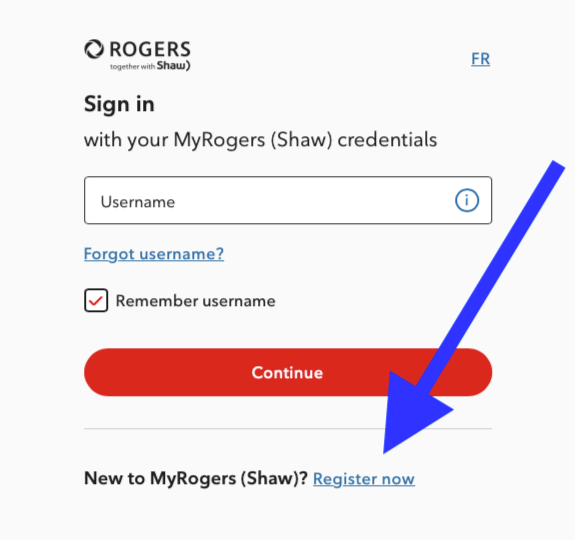
MyRogers (Shaw) sign-in page showing the Register now link for customers who need to create a username.
Remember, this is your Rogers/Shaw account login, not necessarily your email address and email password.
Step 2: Find Your Internet Services
Once you've signed in, look for My Services near the top of the page.
Select Internet.
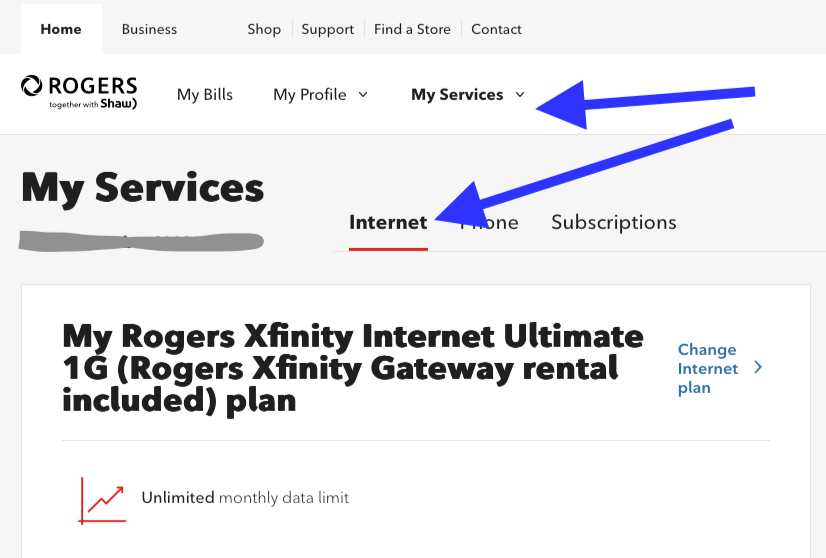
MyRogers (Shaw) account dashboard highlighting My Services and the Internet tab used to locate email account settings.
Depending on your screen size, some menu options may be tucked away under a menu icon.
Step 3: Find Your Email Accounts
Scroll down until you see the section called Email Accounts.
Find the Shaw email address you want to update and select Edit.
You should then see an option to enter a new email password.
Choose your new password and select Update to save it.
That's it!
You've now updated your Shaw email password. Yay!
Step 4: Update Your Phone and Computer
Now here's something important.
If you use the same Shaw email account on your iPhone, iPad, Mac, or Windows computer, you may need to enter your new password in those email programs as well.
Otherwise, your devices may continue asking for the old password.
That familiar little message saying "Please re-enter your password" may finally make a little more sense!
If you're unsure how to update your devices, don't worry. It's something we can work through together.
An Important Update About Shaw Email Accounts
As of February 26, 2026, Rogers no longer allows customers to create new @shaw.ca email addresses.
But don't panic!
If you already have a Shaw email address, you can continue using it.
You can still access your messages, manage your existing account, and change your password.
It's the creation of brand-new Shaw email addresses that has stopped.
You Don't Have to Figure Everything Out Yourself
I hope this helps clarify the difference between your MyRogers account and your Shaw email account.
And if you've been struggling with these confusing instructions, I can completely empathize.
Technology companies often use terminology that makes perfect sense to their engineers but very little sense to the rest of us.
The problem isn't necessarily your ability to learn.
Sometimes it's simply the way information is explained.
And that's where having someone patiently sit beside you and walk through the process can make all the difference.
If you're still having trouble with your Shaw email, passwords, iPhone, or computer, please feel free to reach out.
I offer friendly, one-on-one, in-home technology tutoring for seniors throughout Sidney, Saanich, and Greater Victoria.
I'd be happy to help you get things sorted!
Click the button to reach out to me.
Cheers!
Gavin Koh
Seniors Tech Tutor
*Technical references: Rogers' official support
